Showing posts with label DirectX12. Show all posts

Monday, July 20, 2020

Running Simple DirectX12 Compute Shader: Looking into Dispatch xyz, numthreads xyz, SV_GroupIndex and SV_GroupID xyz

There are many arguments to run compute shader and many arguments are passed to compute shader main function.

On this post, a computer shader is executed with
  • Dispatch(4,1,1)
  • numthreads(3,1,1)
to see what argument values are passed to compute shader main function.

Source code

Compute shader: https://sourceforge.net/p/playpcmwin/code/HEAD/tree/PlayPcmWin/WWDirectCompute12Test2019/Sandbox.hlsl

C++ program to run the compute shader: https://sourceforge.net/p/playpcmwin/code/HEAD/tree/PlayPcmWin/WWDirectCompute12Test2019/TestSandboxShader.cpp

Compute shader to run on the GPU

Sandbox.hlsl : this compute shader is called with Dispatch(4,1,1)
RWStructuredBuffer<float> g_output   : register(u0);

[numthreads(3, 1, 1)]
void
CSMain(
    uint tid : SV_GroupIndex,                 // 0 <= tid < 3 ← numthreads(3,1,1)
    uint3 groupIdXYZ : SV_GroupID)   // 0 <= groupIdXYZ.x < 4
Dispatch(xyz=(4,1,1))
{
    int idx = tid + groupIdXYZ.x * 5;
    g_output[idx] = 1;
}

Shader setup

Please refer TestSandboxShader.cpp. It compiles Sandbox.hlsl as a compute shader, prepares GPU buffer of 4096 bytes and sets Unordered Access View, creates compute state, calls Dispatch(4,1,1), and copy GPU buffer memory values to CPU memory of float array.
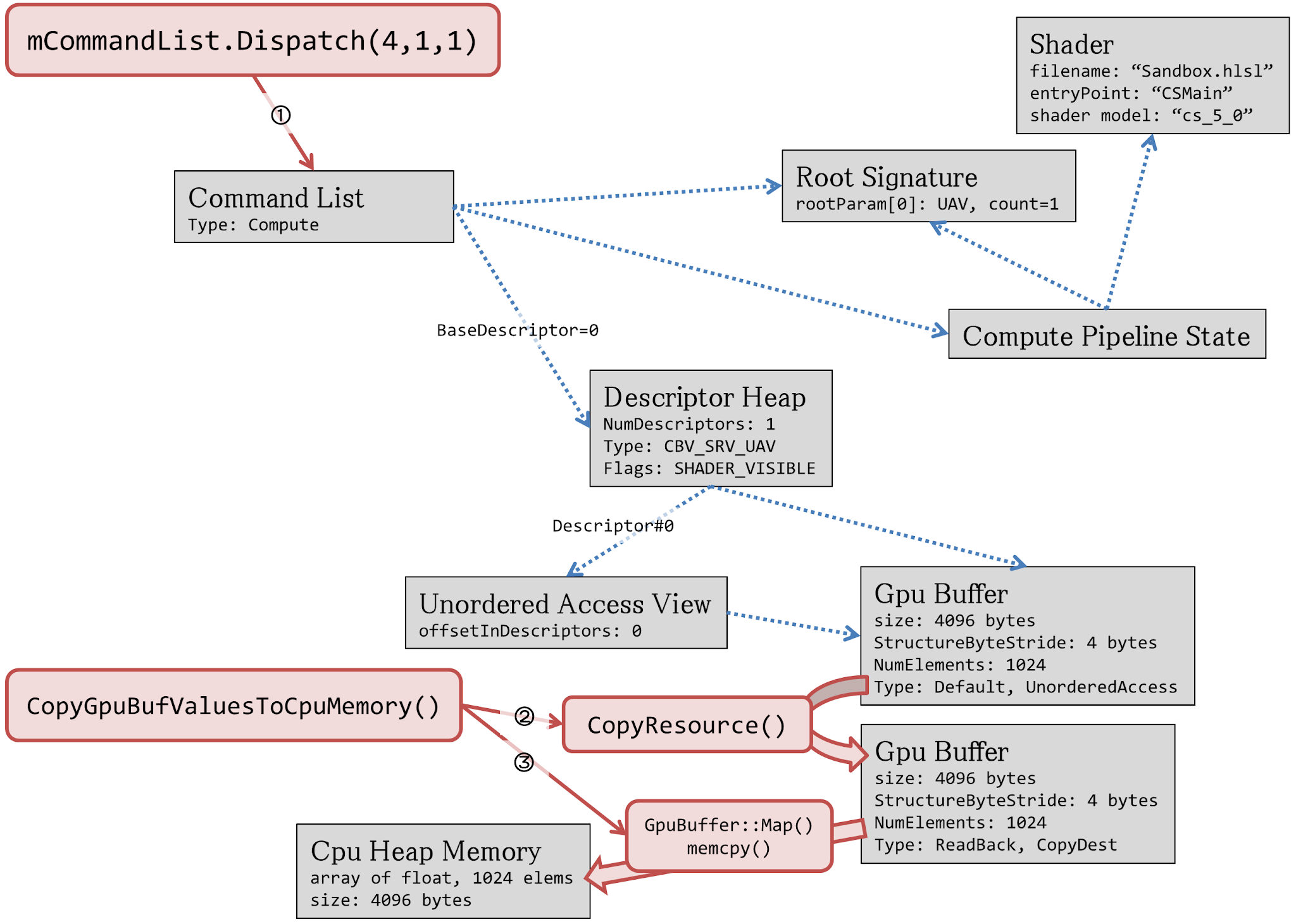

Compute Shader resources, shader main function arguments and thread group

Unordered Access View u0 is visible from the compute shader. Shader can read/write to this buffer.

CSMain function is called 12 times total, function argument of each call is as follows:
CSMain(tid=0, groupIdXYZ=0,0,0)
CSMain(tid=1, groupIdXYZ=0,0,0)
CSMain(tid=2, groupIdXYZ=0,0,0)

CSMain(tid=0, groupIdXYZ=1,0,0)
CSMain(tid=1, groupIdXYZ=1,0,0)
CSMain(tid=2, groupIdXYZ=1,0,0)

CSMain(tid=0, groupIdXYZ=2,0,0)
CSMain(tid=1, groupIdXYZ=2,0,0)
CSMain(tid=2, groupIdXYZ=2,0,0)

CSMain(tid=0, groupIdXYZ=3,0,0)
CSMain(tid=1, groupIdXYZ=3,0,0)
CSMain(tid=2, groupIdXYZ=3,0,0)
3 subsequent calls share the same groupIdXYZ and those 3 calls are executed "simultaneously": GPU has several hundred cores. 3 tasks are assigned to 3 individual GPU cores and they runs in parallel (See the following image). On more practical compute shader, it is important to run 128 or more shaders in parallel: something like numthreads(128,1,1) to utilize GPU cores fully.
Those 3 function calls that shares the same groupIdXYZ is called the thread group. GPU function calls of the same thread group can share thread group shared memory (TGSM) that is significantly faster than UAV memory, while TGSM size is limited to 32 KB or so. Utilizing TGSM is one of the key technique to accelerate GPU computation.

On this Sandbox compute shader, each shader writes adjacent GPU memory position simultaneously. This slows down write operation. It is better for each threadgroup threads to write to more remote memory position each other to write data more quickly.

Values written to u0 GPU memory

Sandbox.hlsl shader writes those values to the GPU buffer memory u0:g_Output.
    i, g_output[i], Shader function args to write this value
    0, 1.000000,   <== CSMain(tid=0, groupIdXYZ=0,0,0)
    1, 1.000000,   <== CSMain(tid=1, groupIdXYZ=0,0,0)
    2, 1.000000,   <== CSMain(tid=2, groupIdXYZ=0,0,0)
    3, 0.000000,
    4, 0.000000,
    5, 1.000000,   <== CSMain(tid=0, groupIdXYZ=1,0,0)
    6, 1.000000,   <== CSMain(tid=1, groupIdXYZ=1,0,0)
    7, 1.000000,   <== CSMain(tid=2, groupIdXYZ=1,0,0)
    8, 0.000000,
    9, 0.000000,
   10, 1.000000,   <== CSMain(tid=0, groupIdXYZ=2,0,0)
   11, 1.000000,   <== CSMain(tid=1, groupIdXYZ=2,0,0)
   12, 1.000000,   <== CSMain(tid=2, groupIdXYZ=2,0,0)
   13, 0.000000,
   14, 0.000000,
   15, 1.000000,   <== CSMain(tid=0, groupIdXYZ=3,0,0)
   16, 1.000000,   <== CSMain(tid=1, groupIdXYZ=3,0,0)
   17, 1.000000,   <== CSMain(tid=2, groupIdXYZ=3,0,0)
   18, 0.000000,
   19, 0.000000,
   20, 0.000000,
   21, 0.000000,
   22, 0.000000,
   23, 0.000000,
   24, 0.000000,


Tuesday, January 1, 2019

Modifying D3D12HelloFrameBuffering desktop to support fullscreen

DirectX-Graphics-Samples-master\Samples\Desktop\D3D12HelloWorld\src\HelloFrameBuffers

There is D3D12Fullscreen desktop project but it is little bit complicated so I modified D3D12FrameBuffering desktop project to enable Fullscreen capability.

D3D12FrameBuffering Project setting

Right click D3D12FrameBuffering Project top open D3D12HelloFrameBuffering property pages.
Select configuration to "All configurations"
On Configuration Options > Manifest Tool > All options, set DPI Awareness to Per Monitor High DPI Aware.

Win32Application class


Copy  WM_SIZE handler from D3D12Fullscreen Win32Application to WindowProc()

DXSample class


Add OnSizeChanged() pure virtual function declaration to DXSample class
 virtual void OnSizeChanged(UINT width, UINT height, bool minimized) = 0;

Copy SetWindowBounds() from D3D12Fullscreen DXSample.
Add     RECT m_windowBounds; member.


D3D12HelloFrameBuffering class


Comment out following line to enable ALT+Enter

factory->MakeWindowAssociation(Win32Application::GetHwnd(), DXGI_MWA_NO_ALT_ENTER)


Add bool m_windowedMode variable to D3D12HelloFrameBuffering class.


Copy those functions from D3D12Fullscreen to D3D12HelloFrameBuffer
 void LoadSizeDependentResources();
 void UpdatePostViewAndScissor();
 void LoadSceneResolutionDependentResources();

 virtual void OnSizeChanged(UINT width, UINT height, bool minimized);


 PopulateCommandList() is unchanged.

This is my UpdatePostViewAndScissor() implementation:

void D3D12HelloFrameBuffering::UpdatePostViewAndScissor()
{
    float x = 1.0f;
    float y = 1.0f;

    m_viewport.TopLeftX = m_width * (1.0f - x) / 2.0f;
    m_viewport.TopLeftY = m_height * (1.0f - y) / 2.0f;
    m_viewport.Width = x * m_width;
    m_viewport.Height = y * m_height;

    m_scissorRect.left = static_cast<LONG>(m_viewport.TopLeftX);
    m_scissorRect.right = static_cast<LONG>(m_viewport.TopLeftX + m_viewport.Width);
    m_scissorRect.top = static_cast<LONG>(m_viewport.TopLeftY);
    m_scissorRect.bottom = static_cast<LONG>(m_viewport.TopLeftY + m_viewport.Height);
}


m_resolutionOptions[], m_postViewport, m_postScissorRect, m_postCommandList and LoadSceneResolutionDependentResources() is not absolute necessary

 Call LoadSizeDependentResources() on the last portion of LoadAssets()

Run and press ALT+Enter to switch fullscreen

Screen shot of D3D12HelloFrameBuffering, 3840x2160 fullscreen mode


Studying D3D12HelloConstBuffers desktop sample


DirectX-Graphics-Samples-master\Samples\Desktop\D3D12HelloWorld\src\HelloConstBuffers

•Describe how to pass constant buffer to shaders.

Diff from D3DXHelloTriangle.h


struct SceneConstantBuffer
    {
        XMFLOAT4 offset;
    };
SceneConstantBuffer m_constantBufferData;
// constant buffer view (CBV) descriptor heap.
ComPtr<ID3D12DescriptorHeap> m_cbvHeap;
ComPtr<ID3D12Resource> m_constantBuffer;
UINT8* m_pCbvDataBegin;

D3D12HelloConstBuffers objects and their relations


m_constantBuffer->Map() is called to get mapped pointer m_cbvDataBegin on OnInit() and m_constantBuffer is never Unmap() ed. Keep constant buffer mapped is OK

OnUpdate(), constant buffer data is updated and memcpy() ed to m_cbvDataBegin.

m_commandList->SetDescriptorHeaps() and m_commandList->SetGraphicsRootDesrptorTable() to set m_cbvHeap.

on Shaders.hlsl, constant buffer is exposed at register(b0):

cbuffer SceneConstantBuffer : register(b0)

{

    float4 offset;

};


Monday, December 31, 2018

Studying D3D12HelloFrameBuffer desktop project


DirectX-Graphics-Samples-master\Samples\Desktop\D3D12HelloWorld\src\HelloFrameBuffering

Shows optimal vsync waiting. Should investigate in detail.

Difference from HelloTriangle sample

 
D3D12HelloFrameBuffering.h
ComPtr<ID3D12CommandAllocator> m_commandAllocators[FrameCount];
Two command allocators. Note m_commandList is still one instance.
UINT64 m_fenceValues[FrameCount];
There are two fences are used. m_fence is one instance.
void MoveToNextFrame();
add Signal() with m_fence to m_commandQueue  and set completion event and wait until the signal of previous MoveToNextFrame() is processed on GPU. If previous MoveToNextFrame() signal is already reached, this function does not block.
void WaitForGpu();
add Signal() with m_fence to m_commandQueue and set completion event and wait until this signal is processed on GPU. This function always blocks.

Double buffering of draw commands

 
There are two commandAllocators and command list is double buffered, one frame time of delay is acceptable.

m_fence is only one instance while m_fenceValues has two integer value to remember previous fence value.

m_fenceValues[] Initialized with zeros on constructor.

LoadAssets() increments m_fenceValues[0] twice and the value becomes 2, m_fenceValues[1] remains 0;

On the first MoveToNextFrame()

m_fenceValues[0] is 2. currentFenceValue :=2  and m_fence is passed to commandQueue->Signal()

m_frameIndex changes from 0 to 1

Function never blocks

m_fenceValues[1] := 3;

GPU executes commandList and redraw buffer 0 and when GPU reaches signal command, m_fence completed value will become 2.

Second MoveNextFrame() call

m_fenceValues[1] is 3 and currentFenceValue :=3 and m_fence is passed to commandQueue->Signal(). after previous commandList execution is finished, GPU will executes commandList and redraw buffer 1.

m_frameIndex changes from 1 to 0. If commandQueue does not reach to previous MoveToNextFrame() Signal value (==2), block until m_fence value becomes 2.


Sunday, December 30, 2018

Studying D3D12HelloTexture desktop project


DirectX-Graphics-Samples-master\Samples\Desktop\D3D12HelloWorld\src\HelloTexture
Paints 2d texture (checkerboard image) to triangle.

Difference from D3D12HelloTriangle

 
Took diff with WinMerge to find difference.

D3D12HelloTexture.h

static const UINT TextureWidth = 256;

static const UINT TextureHeight = 256;

static const UINT TexturePixelSize = 4;

struct Vertex

    {

        XMFLOAT3 position;

        XMFLOAT2 uv; //< texture UV instead of vertex color.

    };

ComPtr<ID3D12DescriptorHeap> m_srvHeap;

ComPtr<ID3D12Resource> m_texture;


Texture UV corrdinate


Direct X traditionally uses right=X+, down=Y+ coordinates for UV.

 Objects and their relations


 Changes from HelloTriangle example is highlighted in orange.


m_texture
width=256px, height=256px, pixelformat=RGBA8888
mipmap level=1
initialized as COPY_DEST state (ready to update texture image)
UpdateSubResources() to upload texture image of CPU memory to texture GPU memory
change resource state to PIXEL_SHADER_RESOURCE for pixel shader to read
sampler
defines texture sampler behavior such as texture clamp and mip map parameters.
m_rootSignature has this sampler info.
m_srvHeap (Shader Resource View heap)
Pixel shader sees m_texture via m_srvHeap.
m_commandList connects m_srvHeap via those calls:
ID3D12DescriptorHeap* ppHeaps[] = { m_srvHeap.Get() };
m_commandList->SetDescriptorHeaps(_countof(ppHeaps), ppHeaps);
m_commandList->SetGraphicsRootDescriptorTable(
  0, m_srvHeap->GetGPUDescriptorHandleForHeapStart());
 

PipelineStateDesc.InputLayout is changed to input texture UV instead of vertex color.

 Shader code

 DirectX-Graphics-Samples-master\Samples\Desktop\D3D12HelloWorld\src\HelloTexture\shaders.hlsl
Vertex shader pass through input position and UV value.
Pixel shader samples texture to get pixel color.


Saturday, December 29, 2018

Studying D3D12HelloTriangle and D3D12HelloBundles desktop project

D3D12HelloTriangle


Difference from D3D12HelloWorld

Took diff with WinMerge to find difference.

D3D12HelloTriangle class has several new members
CD3DX12_VIEWPORT m_viewport;
CD3DX12_RECT m_scissorRect;
ComPtr<ID3D12RootSignature> m_rootSignature;
ComPtr<ID3D12PipelineState> m_pipelineState;
ComPtr<ID3D12Resource> m_vertexBuffer;
D3D12_VERTEX_BUFFER_VIEW m_vertexBufferView;
New struct declaration of triangle vertex
struct Vertex {
    XMFLOAT3 position;
    XMFLOAT4 color;
};


D3D12HelloTriangle.cpp objects and their relations

m_rootSignature

rootSignature specifies shader input parameters such as vertex buffer location or shader constants.

But vertex buffer is specified by m_commandList->IASetVertexBuffers() and shader does not use shader constants.

m_rootSignature is referenced by pipeline state object and pso uses it internally.

m_commandList also referenced m_rootSignature but it seems it is not absolute necessary on this sample.

m_viewPort

specifies viewport size (used to scale images to fit client area)

m_scissorRect

this parameter is used for “scissoring” : scissors triangles which crosses window edge to prevent corruption of geometry shape.

m_pipelineState

contains rendering pipeline parameters such as vertex shader, pixel shader, alpha blending, render target format and m_rootSignature

m_vertexBuffer

contains triangle vertices position and vertex colors data.

data is placed on GPU memory.

m_vertexBufferView

struct to store GPU memory address of vertex buffer and its size info.

used by m_commandList

Shader code
 
Shader is a program that runs on GPU.

D3D12HelloTriangle sample contains shaders.hlsl

shaders.hlsl contains vertex shader VSMain() and pixel shader PSMain().

VSMain() processes one vertex, input vertex position and color from arg, and send it to subsequent stage. VSMain() is called 3 times.

PSMain() is called on every pixel of triangle with VSMain() return value and calculate pixel color.

Shader program is compiled to the executable code on D3D12HelloTriangle::OnInit() by calling D3DCompileFromFile() and those shader binaries is passed to pipeline state object.


D3D12HelloBundles sample


DirectX-Graphics-Samples-master\Samples\Desktop\D3D12HelloWorld\src\HelloBundles

Shows efficient triangle drawing using bundles.


Difference from HelloTriangle sample

 
D3D12HelloBundles.h

ComPtr<ID3D12CommandAllocator> m_bundleAllocator;

ComPtr<ID3D12GraphicsCommandList> m_bundle;

D3D12HelloBundles.cpp

m_bundleAllocator created as COMMAND_LIST_TYPE_BUNDLE

m_bundle command list is created as COMMAND_LIST_TYPE_BUNDLE and  record pipeline setup and draw commands

m_commandList->ExecuteBundle() to execute recorded pipeline setup and draw command